```
---
## Performance Best Practices
- Astro components are static by default (no JS shipped)
- Use `client:load` only when absolutely necessary
- Optimize images with Astro's `
` component
- Keep JavaScript bundle size minimal
- Lazy load below-fold content
---
## Accessibility Guidelines
- Use semantic HTML elements
- Add alt text to all images
- Ensure keyboard navigation works
- Use proper heading hierarchy (h1 → h2 → h3)
- Check color contrast (4.5:1 minimum for text)
- Add ARIA labels for interactive elements
---
## Resources
- **Astro Docs:** https://docs.astro.build
- **Astro AI Guide:** https://docs.astro.build/en/guides/build-with-ai/
- **Astro MCP Server:** https://mcp.docs.astro.build/mcp
- **Astro Discord (#support-ai):** https://astro.build/chat
- **Astro Templates:** https://astro.build/themes/
- **Tailwind CSS Docs:** https://tailwindcss.com/docs
- **shadcn/ui:** https://ui.shadcn.com
- **shadcn/ui MCP Server:** https://ui.shadcn.com/docs/mcp
- **Project README:** See `README.md` for:
- 📦 Installation options (degit, ZIP download, GitHub clone)
- 🚀 Deployment guides (Vercel, Netlify, Cloudflare, GitHub Pages)
- 🔍 Troubleshooting common issues (port conflicts, module errors, dark mode, TypeScript)
- 🎨 Component library catalog (16 sections + 11 UI components)
- 🏗️ Build optimization tips and performance best practices
- 📊 Analytics integration examples (Google Analytics, Vercel Analytics)
- 🤖 Detailed AI-friendly development guide
- 📄 License information and acknowledgments
---
## Claude Code Integration (Optional)
For Claude Code users, AstroDeck includes pre-built commands in `.claude/commands/`:
| Command | Description |
|---------|-------------|
| `/new-page` | Create a new page with proper layout and SEO |
| `/new-section` | Create a reusable section component |
| `/audit` | Run comprehensive quality checks |
| `/theme` | Customize design tokens and colors |
| `/plenum` | Multi-agent review (scope-based, parallel) |
These commands are optional enhancements. The `AGENTS.md` file remains the primary source of truth for all AI coding tools.
---
**Remember:** Keep code simple, follow the patterns, prioritize user experience.
---
# Part 2: README.md (human documentation)
> 🎨 **ASTRODECK** is part of the [TemplateDeck](https://templatedeck.com) collection — handcrafted HTML and Astro templates for developers and designers.
>
> 📥 **[Download free on TemplateDeck](https://templatedeck.com/templates/astrodeck)** · 🌐 **[Browse all templates](https://templatedeck.com)**
---
# AstroDeck
[](https://github.com/holger1411/astrodeck/releases)
[](https://astro.build)
[](LICENSE)
**A modern, open-source component library and starter kit for building stunning Astro.js websites in minutes. Built AI-friendly for seamless development with Claude, Cursor, and other coding assistants.**
AstroDeck provides pre-built, production-ready components that help you launch landing pages, SaaS websites, and marketing sites faster. Built with [Astro](https://astro.build), [Tailwind CSS](https://tailwindcss.com), and [shadcn/ui](https://ui.shadcn.com) components.
[](https://www.astrodeck.dev/)
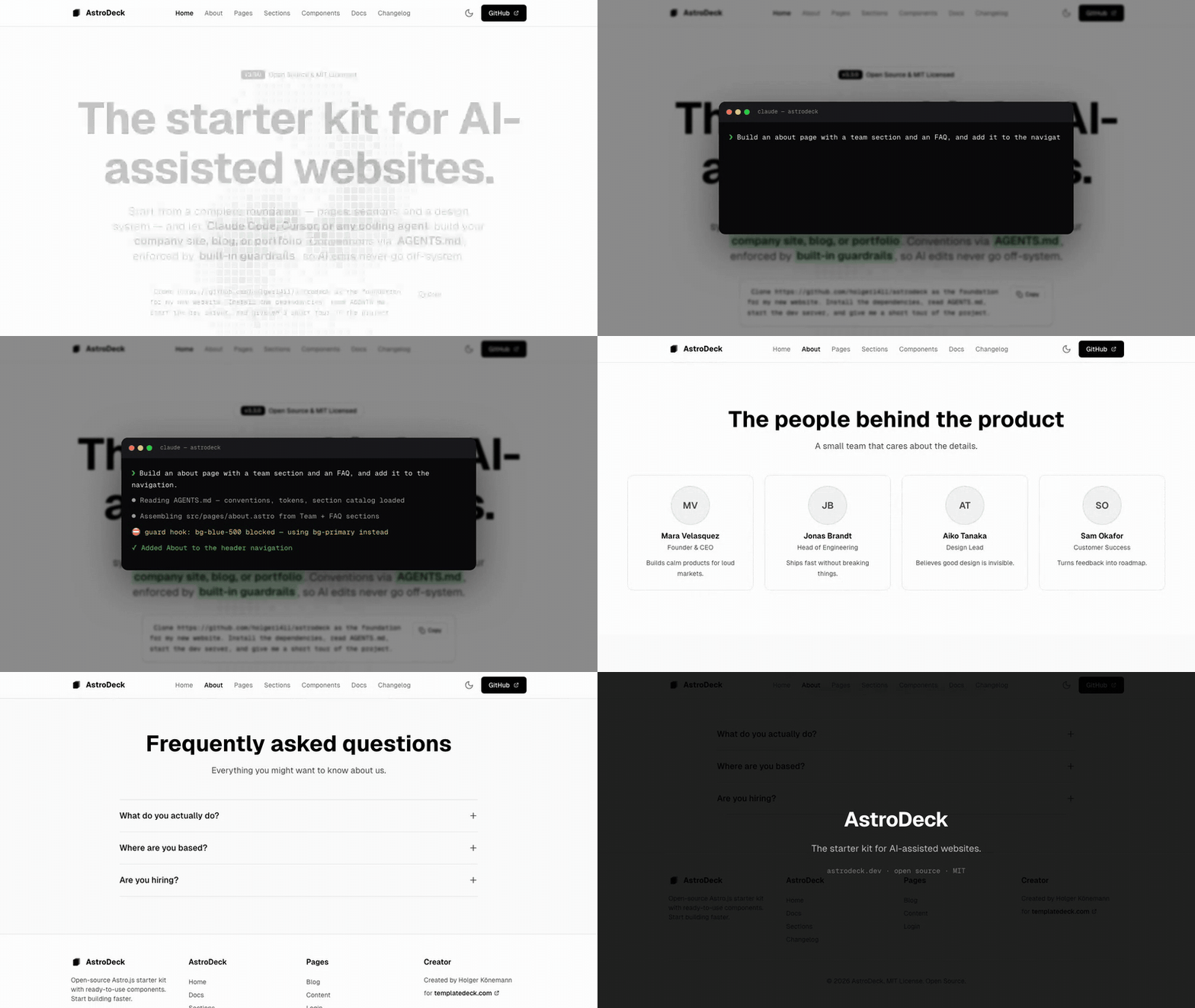
*One prompt — "Build an about page with a team section and an FAQ" — and the agent assembles the page from AstroDeck's sections while the guardrails catch off-system edits.*
▶ [Watch as MP4](https://templatedeck.com/videos/astrodeck/astrodeck-demo.mp4) · [Live demo site](https://www.astrodeck.dev/)
---
## 🧱 Building Blocks
AstroDeck uses a three-tier architecture. Everything you need to build a website falls into one of these tiers:
| Tier | What | Count | Location |
|------|------|-------|----------|
| **Components** | Small UI primitives (Button, Dialog, Tabs...) | 11 | `src/components/ui/` |
| **Sections** | Full page sections (Hero, Pricing, FAQ...) | 16 | `src/components/sections/` |
| **Pages** | Complete page templates (SaaS, Portfolio...) | 11 | `src/pages/` |
**Components** are the smallest pieces — buttons, inputs, cards, dialogs. **Sections** combine components into full-width blocks like a pricing table or FAQ accordion. **Pages** assemble sections into complete, production-ready websites.
## 🚀 Features
- **🤖 AI-Friendly Development** - AGENTS.md standard + multi-agent compatibility (Claude Code, Cursor, Copilot, Windsurf) helps you build faster with any AI assistant
- **📄 LLM-Readable Docs** - `/llms.txt` and `/llms-full.txt` (generated from AGENTS.md + README at build time) so AI agents can read the docs directly
- **✅ CI Included** - GitHub Actions workflow runs `npm run validate` (convention checks, lint, format, astro check) and the build on every push and PR
- **Three-Tier Architecture** - Components, Sections, and Pages provide building blocks at every level of abstraction
- **Multiple Layout Templates** - Boxed, Full-Width, Minimal, Auth, and Article layouts for different page types
- **Fully Responsive** - Mobile-first design that looks great on all devices
- **Dark Mode Support** - Built-in theme switching with persistent preferences
- **TypeScript** - Full type safety throughout the codebase
- **shadcn/ui Components** - Beautiful, accessible React components integrated with Astro (6 Radix UI packages)
- **Animation System** - CSS-only scroll animations via `data-animate` attributes
- **Component Registry** - Machine-readable `src/registry.json` catalog for tooling integration
- **Lightning Fast** - Astro's zero-JS by default approach for optimal performance
- **SEO Optimized** - Built-in OpenGraph, Twitter Cards, BlogPosting structured data, sitemap, full-content RSS feed, and canonical URLs
- **Code Quality Tools** - ESLint and Prettier configured for Astro and TypeScript
- **Easy Customization** - Tailwind CSS for rapid styling adjustments
- **Production Ready** - Optimized builds with analytics integration
---
## 📋 Table of Contents
- [Prerequisites](#-prerequisites)
- [Quick Start](#-quick-start)
- [Installation](#-installation)
- [Development](#-development)
- [Project Structure](#-project-structure)
- [Usage Guide](#-usage-guide)
- [Creating Pages](#creating-pages)
- [Using Components](#using-components)
- [Working with Layouts](#working-with-layouts)
- [Customizing Styles](#customizing-styles)
- [Component Library](#-component-library)
- [Customization](#-customization)
- [Building for Production](#-building-for-production)
- [Deployment](#-deployment)
- [Troubleshooting](#-troubleshooting)
- [AI-Friendly Development](#-ai-friendly-development)
- [Claude Code Agent](#claude-code-agent)
- [AI Documentation Files](#ai-documentation-files)
- [Contributing](#-contributing)
- [License](#-license)
---
## 🔧 Prerequisites
Before you begin, ensure you have the following installed on your machine:
- **Node.js** - Version 22.0.0 or higher (latest LTS recommended)
- **npm** - Comes with Node.js (or use yarn/pnpm)
- **Git** - For cloning the repository
To check your Node.js version, run:
```bash
node --version
```
If you need to install or update Node.js, visit [nodejs.org](https://nodejs.org).
**Important:** AstroDeck uses the **latest versions** of Astro and Tailwind CSS. Always run `npm install` to get the most recent versions.
---
## ⚡ Quick Start
Get AstroDeck running in 3 steps:
```bash
# 1. Create a new project using degit
npx degit holger1411/astrodeck my-project
cd my-project
# 2. Install dependencies
npm install
# 3. Start the development server
npm run dev
```
Open your browser and navigate to `http://localhost:4321` to see your site!
---
## 📦 Installation
### Option 1: Using degit (Recommended)
The fastest way to get started - no git history, clean project:
```bash
# Create a new project
npx degit holger1411/astrodeck my-project
cd my-project
# Install dependencies
npm install
# Start developing
npm run dev
```
### Option 2: Download Release ZIP
Download the latest release directly:
```bash
# Download the latest version
wget https://github.com/holger1411/astrodeck/archive/refs/tags/v3.5.0.zip
# Extract
unzip v3.5.0.zip
cd astrodeck-3.5.0
# Install and run
npm install
npm run dev
```
### Option 3: Clone from GitHub
```bash
# Clone the repository
git clone https://github.com/holger1411/astrodeck.git my-project
# Navigate into the directory
cd astrodeck
# Install dependencies
npm install
```
### Option 4: Use as a Template
1. Click the **"Use this template"** button on GitHub
2. Create a new repository from the template
3. Clone your new repository
4. Install dependencies with `npm install`
### Option 5: Manual Download
1. Download the ZIP file from GitHub
2. Extract it to your desired location
3. Open terminal in the extracted folder
4. Run `npm install`
---
## 🛠️ Development
### Starting the Development Server
```bash
npm run dev
```
This command:
- Starts a local development server
- Watches for file changes and auto-reloads
- Makes your site available at `http://localhost:4321`
- Provides hot module replacement for instant updates
**Expected output:**
```
🚀 astro v7.x.x started in 234ms
┃ Local http://localhost:4321/
┃ Network use --host to expose
```
**Note:** Version numbers will vary based on your installed Astro version. AstroDeck always uses the latest stable release.
### Alternative Start Command
```bash
npm start
```
This is an alias for `npm run dev` and does the same thing.
### Development Tips
- **Auto-reload**: Changes to `.astro`, `.tsx`, and `.css` files trigger automatic browser refresh
- **Error handling**: Check the terminal for build errors and warnings
- **Port in use?**: If port 4321 is busy, Astro will automatically use the next available port
---
## 📁 Project Structure
Understanding the folder structure helps you navigate and customize AstroDeck:
```
astrodeck/
├── public/ # Static assets (fonts, images, favicon)
│ ├── favicon.svg
│ └── fonts/
├── src/
│ ├── components/ # Reusable components
│ │ ├── sections/ # Page sections (16 components)
│ │ │ ├── Hero.astro / HeroSplit.astro / HeroGradient.astro
│ │ │ ├── Features.astro, Pricing.astro, Testimonials.astro
│ │ │ ├── CTA.astro, ContentBlock.astro, LogoCloud.astro
│ │ │ ├── AIFeature.astro, FAQ.astro, Stats.astro
│ │ │ ├── Team.astro, Comparison.astro
│ │ │ ├── Newsletter.astro, Contact.astro
│ │ ├── ui/ # shadcn/ui components (11 components)
│ │ │ ├── button.tsx, card.tsx, badge.tsx, input.tsx, label.tsx
│ │ │ ├── dialog.tsx, accordion.tsx, tabs.tsx
│ │ │ ├── tooltip.tsx, select.tsx, dropdown-menu.tsx
│ │ ├── Header.astro # Main site header
│ │ ├── Footer.astro # Main site footer
│ │ ├── ThemeToggle.astro
│ │ └── LoginForm.tsx # Example React component
│ ├── layouts/ # Page layout templates
│ │ ├── BaseLayout.astro # Boxed layout (max-w-5xl)
│ │ ├── FullWidthLayout.astro # Full-width layout
│ │ ├── MinimalLayout.astro # No header/footer (404, standalone)
│ │ ├── AuthLayout.astro # Auth pages (no header/footer)
│ │ └── ArticleLayout.astro # Blog/article layout
│ ├── pages/ # File-based routing
│ │ ├── index.astro # Homepage (/)
│ │ ├── pages.astro # Pages overview (/pages)
│ │ ├── sections.astro # Section library (/sections)
│ │ ├── docs.astro # Documentation (/docs)
│ │ ├── changelog.astro # Changelog (/changelog)
│ │ ├── blog/ # Blog pages
│ │ ├── templates/ # Template pages
│ │ │ ├── saas.astro # SaaS landing page (/templates/saas)
│ │ │ ├── portfolio.astro # Portfolio/agency (/templates/portfolio)
│ │ │ ├── startup.astro # Product launch (/templates/startup)
│ │ │ └── contact.astro # Contact page (/templates/contact)
│ │ ├── 404.astro # Custom 404 page
│ │ ├── login.astro # Login page (/login)
│ │ ├── privacy.astro # Privacy page (/privacy)
│ │ └── rss.xml.ts # RSS feed endpoint
│ ├── styles/ # Global styles
│ │ └── globals.css # Tailwind + custom styles
│ ├── lib/ # Utilities
│ │ └── utils.ts # Helper functions
│ └── env.d.ts # TypeScript definitions
├── src/registry.json # Machine-readable component catalog
├── astro.config.mjs # Astro configuration
├── tsconfig.json # TypeScript configuration
└── package.json # Dependencies and scripts
```
### Key Directories Explained
- **`src/pages/`** - Each `.astro` file becomes a route (index.astro → `/`, login.astro → `/login`)
- **`src/components/sections/`** - Copy-paste ready sections for building pages
- **`src/layouts/`** - Wrapper templates that provide consistent structure
- **`public/`** - Files served as-is (no processing)
---
## 📖 Usage Guide
### Creating Pages
Astro uses file-based routing. Create a new file in `src/pages/` to add a new route.
**Example: Creating an About page**
Create `src/pages/about.astro`:
```astro
---
import BaseLayout from "@/layouts/BaseLayout.astro";
---
About AstroDeck
We're building the best component library for Astro.
```
Now visit `http://localhost:4321/about` to see your new page!
### Using Components
AstroDeck components are modular and easy to use. Import them into your pages.
**Example: Adding a Hero section**
```astro
---
import BaseLayout from "@/layouts/BaseLayout.astro";
import Hero from "@/components/sections/Hero.astro";
import Features from "@/components/sections/Features.astro";
---
```
**Example: Using UI components**
```astro
---
import { Button } from "@/components/ui/button";
import { Badge } from "@/components/ui/badge";
---
New
Featured Product
```
### Working with Layouts
Layouts provide consistent page structure. AstroDeck includes several layouts:
#### 1. BaseLayout (Boxed)
Centered content with max-width constraint. Best for content-focused pages.
```astro
---
import BaseLayout from "@/layouts/BaseLayout.astro";
---
Welcome
```
#### 2. FullWidthLayout
Full-width layout for showcase pages. Used in the sections library.
```astro
---
import FullWidthLayout from "@/layouts/FullWidthLayout.astro";
---
```
#### 3. AuthLayout
Minimal layout without header/footer. Perfect for login, signup, and auth flows.
```astro
---
import AuthLayout from "@/layouts/AuthLayout.astro";
---
```
#### 4. MinimalLayout
Full-width layout without header or footer. Ideal for standalone pages like 404, maintenance, or landing pages.
```astro
---
import MinimalLayout from "@/layouts/MinimalLayout.astro";
---
404 - Page Not Found
```
### Customizing Styles
AstroDeck uses Tailwind CSS for styling. Here's how to customize:
#### Changing Colors
AstroDeck uses **Tailwind CSS v4** with the modern **OKLCH color format**. Edit `src/styles/globals.css`:
```css
@theme {
/* Light mode colors */
--color-background: oklch(100% 0 0);
--color-foreground: oklch(9.8% 0.0016 286.75);
--color-primary: oklch(11.2% 0.0079 286.75); /* Change this */
--color-primary-foreground: oklch(98% 0.0011 286.75);
/* ... more colors */
}
.dark {
/* Dark mode overrides */
--color-background: oklch(1.5% 0 0);
--color-foreground: oklch(98% 0 0);
--color-primary: oklch(98% 0 0); /* Dark mode primary */
--color-primary-foreground: oklch(1.5% 0 0);
/* ... more colors */
}
```
**OKLCH Format:** `oklch(lightness% chroma hue)`
- **Lightness:** 0-100% (0 = black, 100 = white)
- **Chroma:** Color intensity (0 = grayscale, higher = more vivid)
- **Hue:** Color angle in degrees (0-360)
#### Adding Custom Fonts
1. Add font files to `public/fonts/`
2. Update `src/styles/globals.css`:
```css
@font-face {
font-family: 'MyFont';
src: url('/fonts/MyFont.woff2') format('woff2');
}
body {
font-family: 'MyFont', sans-serif;
}
```
#### Custom CSS Classes
Add global styles to `src/styles/globals.css`:
```css
.custom-gradient {
background: linear-gradient(135deg, #667eea 0%, #764ba2 100%);
}
```
Then use in components:
```astro
Custom styled section
```
---
## 🎨 Component Library
AstroDeck's building blocks are organized into three tiers. Visit `/sections` in your browser to see sections with live previews.
### Tier 1: Components (11) — `src/components/ui/`
Small, reusable React UI primitives built with shadcn/ui and Radix UI. Use with `client:load` for interactivity.
- **Button, Card, Badge, Input, Label** - Core primitives
- **Dialog** - Modal with backdrop blur
- **Accordion** - Radix-based accordion
- **Tabs** - Pill-style tabs
- **Tooltip** - Popup tooltips
- **Select** - Styled dropdown select
- **DropdownMenu** - Positioned dropdown menu
### Tier 2: Sections (16) — `src/components/sections/`
Full-width page sections that combine layout, typography, and content into complete visual blocks. Drop them into any page and pass your content as props.
#### Hero Sections (3 variants)
- **Hero.astro** - Centered hero with GitHub grid pattern background
- **HeroSplit.astro** - Split layout with text left, visual right
- **HeroGradient.astro** - Animated gradient glow orbs background
#### Content Sections
- **Features.astro** - Feature grid with icons
- **Pricing.astro** - Pricing table with tiers
- **Testimonials.astro** - Customer testimonial cards
- **CTA.astro** - Call-to-action section
- **ContentBlock.astro** - Flexible content block
- **LogoCloud.astro** - Brand logo showcase
- **AIFeature.astro** - AI feature highlight
- **FAQ.astro** - CSS-only accordion with Schema.org LD+JSON for SEO
- **Stats.astro** - Metrics grid with semantic `dl`/`dd`/`dt` markup
- **Team.astro** - Team member cards with social links
- **Comparison.astro** - Feature comparison table
- **Newsletter.astro** - Email signup form
- **Contact.astro** - Two-column contact form
### Tier 3: Pages (11) — `src/pages/`
Complete, production-ready pages that combine multiple sections with a layout. Copy a template page and customize the section props and content.
- **Homepage** (`/`) - Main landing page
- **SaaS Landing** (`/templates/saas`) - SaaS product page
- **Portfolio** (`/templates/portfolio`) - Portfolio/agency page
- **Startup** (`/templates/startup`) - Product launch page
- **Contact** (`/templates/contact`) - Contact page template
- **Blog** (`/blog`) - Blog listing + individual posts
- **Docs** (`/docs`) - Documentation page
- **Login** (`/login`) - Authentication page
- **Sections Library** (`/sections`) - Live component previews
- **Changelog** (`/changelog`) - Version history
- **Privacy** (`/privacy`) - Privacy policy
### How the Tiers Work Together
```astro
---
// A Page assembles Sections, which may use Components internally
import BaseLayout from "@/layouts/BaseLayout.astro";
import Hero from "@/components/sections/Hero.astro";
import Pricing from "@/components/sections/Pricing.astro";
import CTA from "@/components/sections/CTA.astro";
---
```
---
## 🎨 Customization
### Theme Configuration
AstroDeck uses CSS variables for theming, making it easy to switch between light and dark modes.
#### Customizing Theme Colors
Edit `src/styles/globals.css` using the **OKLCH color format** (Tailwind v4):
```css
@theme {
/* Light mode colors */
--color-background: oklch(100% 0 0);
--color-foreground: oklch(9.8% 0.0016 286.75);
--color-primary: oklch(11.2% 0.0079 286.75);
--color-primary-foreground: oklch(98% 0.0011 286.75);
--color-secondary: oklch(96.1% 0.0011 286.75);
--color-muted: oklch(96.1% 0.0011 286.75);
/* Add more custom colors */
}
.dark {
/* Dark mode overrides */
--color-background: oklch(1.5% 0 0);
--color-foreground: oklch(98% 0 0);
--color-primary: oklch(98% 0 0);
--color-primary-foreground: oklch(1.5% 0 0);
}
```
**Why OKLCH?** Better perceptual uniformity than HSL. Colors appear more consistent to the human eye.
### Modifying Components
All components are open and customizable. Simply edit the files in `src/components/`.
**Example: Customizing the Hero**
Edit `src/components/sections/Hero.astro`:
```astro
```
### Adding Analytics
AstroDeck includes Vercel Analytics integration. To enable:
1. Deploy to Vercel
2. Analytics are automatically enabled
For other analytics platforms:
**Google Analytics:**
Add to `src/layouts/BaseLayout.astro`:
```astro
```
---
## 🏗️ Building for Production
### Build Your Site
```bash
npm run build
```
This command:
- Compiles your Astro site to static HTML/CSS/JS
- Optimizes assets (images, fonts, scripts)
- Outputs production files to the `dist/` folder
- Performs TypeScript type checking
**Expected output:**
```
building client (vite)
building server (vite)
generating static routes
▶ src/pages/index.astro
└─ /index.html (+234ms)
▶ src/pages/login.astro
└─ /login/index.html (+12ms)
✓ Completed in 3.45s.
```
### Preview the Production Build
Test your production build locally before deploying:
```bash
npm run preview
```
This starts a local server serving your `dist/` folder at `http://localhost:4321`.
### Build Optimization Tips
- **Image Optimization**: Use Astro's `
` component for automatic optimization
- **Remove unused CSS**: Tailwind automatically purges unused styles in production
- **Bundle size**: Check `dist/` folder size - should be < 500KB for most sites
- **Lighthouse scores**: Run audits with Chrome DevTools
---
## 🚀 Deployment
AstroDeck works with any static hosting provider. Here are the most popular options:
### Deploy to Vercel (Recommended)
**Why Vercel?**
- Free for personal projects
- Automatic deployments from Git
- Built-in analytics
- Global CDN
**Steps:**
1. Push your code to GitHub
```bash
git init
git add .
git commit -m "Initial commit"
git branch -M main
git remote add origin https://github.com/yourusername/your-repo.git
git push -u origin main
```
2. Visit [vercel.com](https://vercel.com)
3. Click "Import Project"
4. Select your GitHub repository
5. Click "Deploy"
**Done!** Your site is live in ~30 seconds.
### Deploy to Netlify
1. Push to GitHub (see above)
2. Visit [netlify.com](https://netlify.com)
3. Click "Add new site" → "Import an existing project"
4. Connect GitHub and select your repo
5. Build settings (auto-detected):
- Build command: `npm run build`
- Publish directory: `dist`
6. Click "Deploy"
### Deploy to Cloudflare Pages
```bash
# Install Wrangler CLI
npm install -g wrangler
# Login to Cloudflare
wrangler login
# Deploy
npx wrangler pages deploy dist
```
### Deploy to GitHub Pages
1. Install the GitHub Pages adapter:
```bash
npm install --save-dev @astrojs/github-pages
```
2. Update `astro.config.mjs`:
```js
import { defineConfig } from 'astro/config';
export default defineConfig({
site: 'https://yourusername.github.io',
base: '/your-repo-name',
});
```
3. Create `.github/workflows/deploy.yml`:
```yaml
name: Deploy to GitHub Pages
on:
push:
branches: [main]
jobs:
build:
runs-on: ubuntu-latest
steps:
- uses: actions/checkout@v3
- uses: actions/setup-node@v3
with:
node-version: 22
- run: npm ci
- run: npm run build
- uses: peaceiris/actions-gh-pages@v3
with:
github_token: ${{ secrets.GITHUB_TOKEN }}
publish_dir: ./dist
```
4. Enable GitHub Pages in your repository settings
### Other Platforms
AstroDeck works with:
- **AWS Amplify** - Connect GitHub and deploy
- **Render** - Static site hosting
- **Digital Ocean App Platform**
- **Firebase Hosting**
- **Surge.sh** - Simple CLI deployment
All require the same build settings:
- **Build command**: `npm run build`
- **Publish directory**: `dist`
- **Node version**: 22 or higher
---
## 🔍 Troubleshooting
### Common Issues and Solutions
#### Port Already in Use
**Problem:** `Error: listen EADDRINUSE: address already in use :::4321`
**Solution:**
```bash
# Kill the process using port 4321
lsof -ti:4321 | xargs kill
# Or use a different port
npm run dev -- --port 3000
```
#### Module Not Found Errors
**Problem:** `Cannot find module '@/components/...'`
**Solution:**
```bash
# Delete node_modules and reinstall
rm -rf node_modules package-lock.json
npm install
```
#### Dark Mode Not Working
**Problem:** Theme toggle doesn't switch modes
**Solution:**
1. Check browser console for JavaScript errors
2. Ensure `ThemeToggle.astro` script is running
3. Clear browser cache and localStorage
#### Build Fails with TypeScript Errors
**Problem:** `tsc` errors during build
**Solution:**
```bash
# Check for type errors
npm run build
# Fix import paths - use @/ for src directory
# Wrong: import Header from '../components/Header.astro'
# Right: import Header from '@/components/Header.astro'
```
#### Styles Not Applying
**Problem:** Tailwind classes not working
**Solution:**
1. Tailwind CSS v4 uses CSS-based configuration in `src/styles/globals.css` (no `tailwind.config.mjs`)
2. Restart dev server after config changes
3. Check for typos in class names
### Getting Help
- **Documentation**: [docs.astro.build](https://docs.astro.build)
- **GitHub Issues**: [Report a bug](https://github.com/yourusername/astrodeck/issues)
- **Discord**: [Join Astro community](https://astro.build/chat)
---
## 🤖 AI-Friendly Development
AstroDeck is designed to work seamlessly with AI coding assistants like Claude, ChatGPT, Cursor, GitHub Copilot, and others. We've included specialized documentation to help AI tools understand the project structure and provide better assistance.
### Claude Code Agent
AstroDeck includes a dedicated **Claude Code Agent** that acts as your personal project expert. The agent understands AstroDeck's architecture, conventions, and best practices—helping you build faster while maintaining quality.
#### What the Agent Does
| Category | Features |
|----------|----------|
| **🔧 Development** | Create pages, components, layouts following project patterns |
| **🎨 Design System** | Maintain color, spacing, and typography consistency |
| **🛡️ Security** | Warn about XSS, missing SRI, insecure resources |
| **♿ Accessibility** | Check WCAG compliance, contrast ratios, ARIA labels |
| **🔍 SEO** | Verify meta tags, OpenGraph, heading hierarchy |
| **⚡ Performance** | Identify unoptimized images, missing lazy loading |
#### Using the Agent
The agent is located at `.claude/agents/astrodeck.md` and works automatically with [Claude Code](https://claude.ai/code).
**Automatic Usage:**
When you work on AstroDeck with Claude Code, the agent activates automatically for relevant tasks.
**Explicit Usage:**
```
> Use the astrodeck agent to create a new pricing page
> Have astrodeck review my component for accessibility issues
> Ask astrodeck to check the SEO of this page
```
**Model Selection:**
The agent supports different models based on your needs:
- **Sonnet** (default): Balanced for most development tasks
- **Opus**: Complex architectural decisions and deep analysis
- **Haiku**: Quick lookups and simple operations
```
> Use astrodeck with opus to review the project architecture
```
#### Agent Capabilities
**Proactive Warnings:**
The agent warns you before potential issues become problems:
```
🛡️ SECURITY WARNING
Issue: External script without Subresource Integrity (SRI)
Risk: Script could be modified by attackers
Fix: Add integrity attribute or host script locally
♿ ACCESSIBILITY WARNING
Issue: Image missing alt text
Impact: Screen readers cannot describe the image
Fix: Add descriptive alt attribute
🔍 SEO WARNING
Issue: Page missing OpenGraph meta tags
Impact: Poor social media sharing appearance
Fix: Add og:title, og:description, og:image
```
**DRY Enforcement:**
The agent detects code duplication and suggests improvements:
```
⚠️ DRY WARNING
Similar code found in:
- src/components/sections/Hero.astro
- src/components/sections/CTA.astro
Recommendation: Extract into a reusable component
```
#### Recommended MCP Servers
For the best experience, the agent can leverage these optional MCP servers:
**Context7** (Documentation):
```json
// For up-to-date Astro, Tailwind, React, shadcn/ui docs
// https://github.com/upstash/context7
```
**Lighthouse MCP** (Audits):
```json
{
"mcpServers": {
"lighthouse": {
"command": "npx",
"args": ["@danielsogl/lighthouse-mcp@latest"]
}
}
}
```
### AI Documentation Files
AstroDeck follows the **[AGENTS.md standard](https://agents.md)** – an open format for guiding AI coding agents, used by **60,000+ open-source projects** and stewarded by the Linux Foundation.
> *Think of AGENTS.md as a README for AI agents: a dedicated, predictable place to provide context and instructions.*
#### Supported AI Coding Assistants
| Tool | Support | Notes |
|------|---------|-------|
| [OpenAI Codex](https://openai.com/codex/) | ✅ Native | Reads AGENTS.md automatically |
| [GitHub Copilot](https://github.com/features/copilot) | ✅ Native | Coding agent supports AGENTS.md |
| [Cursor](https://cursor.com) | ✅ Native | Reads AGENTS.md and symlinks |
| [Google Jules](https://jules.google) | ✅ Native | Full AGENTS.md support |
| [Gemini CLI](https://github.com/google-gemini/gemini-cli) | ✅ Config | Via `contextFileName` setting |
| [Windsurf](https://windsurf.com) | ✅ Native | Reads AGENTS.md automatically |
| [Zed](https://zed.dev) | ✅ Native | Priority-based file loading |
| [Claude Code](https://claude.ai/code) | ✅ Native | Via `CLAUDE.md` + full `.claude/` integration (agent, commands, skills, hooks) |
| [Aider](https://aider.chat) | ✅ Config | Via `read: AGENTS.md` |
**Plus many more:** Factory, Amp, RooCode, Devin, Kilo Code, Warp, and others.
→ [See full list at agents.md](https://agents.md)
#### File Structure
```
astrodeck/
├── PROJECT.md # 🎯 YOUR project customizations (HIGHEST PRIORITY)
├── AGENTS.md # 📄 AstroDeck defaults (all AI tools)
├── CLAUDE.md # 🔗 Claude Code entry point → AGENTS.md + PROJECT.md
├── .cursorrules # 🔗 Symlink → AGENTS.md (Cursor)
├── .cursor/rules # 📄 Cursor rules directory
├── .github/copilot-instructions.md # 📄 GitHub Copilot instructions
├── .windsurfrules # 📄 Windsurf rules
├── src/registry.json # 📦 Machine-readable component catalog
├── system/
│ ├── globals/ # 🎨 Canonical design knowledge (8 files)
│ │ ├── colors.md # OKLCH palette, token table, semantics
│ │ ├── typography.md # Font stack, heading scale
│ │ ├── spacing.md # Section padding, grids, containers
│ │ ├── interaction.md # Timing tokens, easing, transitions
│ │ ├── imagery.md # Image formats, alt text conventions
│ │ ├── effects.md # Border radius, shadows, card pattern
│ │ ├── responsiveness.md # Breakpoints, mobile-first rules
│ │ └── accessibility.md # WCAG pairs, focus styles, touch targets
│ ├── prompts/ # 📋 Portable self-audit prompts (7 files)
│ │ ├── self-audit-tokens.md
│ │ ├── self-audit-accessibility.md
│ │ ├── self-audit-performance.md
│ │ ├── self-audit-seo.md
│ │ ├── self-audit-darkmode.md
│ │ ├── self-audit-responsive.md
│ │ └── self-audit-cascade.md
│ └── reports/ # 📊 Plenum review reports (gitignored)
└── .claude/
├── agents/
│ ├── astrodeck.md # 🤖 Main agent (quality guardian)
│ ├── design-review.md # Plenum: visual design
│ ├── ux-review.md # Plenum: UX & interaction
│ ├── a11y-review.md # Plenum: accessibility
│ ├── perf-review.md # Plenum: performance
│ ├── seo-review.md # Plenum: SEO
│ └── code-review.md # Plenum: code quality
├── commands/ # ⚡ Slash commands for common tasks
│ ├── new-page.md # /new-page - Create pages
│ ├── new-section.md # /new-section - Create components
│ ├── audit.md # /audit - Quality checks
│ ├── theme.md # /theme - Customize colors
│ ├── launch-check.md # /launch-check - Pre-launch KPI check
│ └── plenum.md # /plenum - Multi-agent review
├── skills/ # 🧠 7 domain skills with KPIs
│ ├── ui-design/ # Visual hierarchy, spacing, typography
│ ├── tailwind/ # Tailwind v4, OKLCH, dark mode
│ ├── accessibility/ # WCAG 2.1 AA, ARIA, keyboard nav
│ ├── astro/ # Astro 7, Content Collections, TypeScript
│ ├── content-seo/ # Meta tags, structured data, RSS
│ ├── qa/ # Testing, Lighthouse, launch readiness
│ └── readme/ # Project documentation
├── hooks/
│ └── guard-conventions.mjs # 🛡️ Auto-blocks deprecated patterns & design-system drift
├── scripts/
│ └── check-kpis.mjs # ✅ All static convention checks (npm run check:kpis)
└── settings.json # ⚙️ Hook registration for Claude Code
```
#### Deterministic Guardrails (Hooks + KPI Script)
Prompt-based rules can be forgotten — hooks cannot. AstroDeck ships two enforcement layers for Claude Code:
- **Convention guard hook** (`.claude/hooks/guard-conventions.mjs`): blocks deprecated Astro patterns (`ViewTransitions`, `z` from `astro:content`) and `tailwind.config.*` creation *before* they reach your codebase, and warns the assistant when an edit introduces hardcoded Tailwind colors, inline styles, or relative `../` imports — so it self-corrects immediately.
- **KPI check script** (`npm run check:kpis`): one command that runs every static convention check (hardcoded colors, inline styles, deprecated imports, missing alt attributes, non-OKLCH tokens, missing meta descriptions). It is the single source of truth referenced by `/audit`, `/launch-check`, and the skills — and it works for human contributors and CI, too.
#### Design Knowledge Base (`system/globals/`)
Central design decisions live in `system/globals/` as 8 standalone Markdown files covering colors, typography, spacing, interaction, imagery, effects, responsiveness, and accessibility. These files are the **canonical source of truth** for every design token and convention in AstroDeck. All skills, prompts, and tool configurations reference them, so changes propagate automatically. Both AI tools and human contributors can consult these files for consistent, informed design decisions without digging through source code.
#### Bring Your Own Design with `DESIGN.md` (optional)
Drop a [Google Stitch `DESIGN.md`](https://github.com/google-labs-code/design.md) file at the project root and tell your coding agent: *"Apply the design from DESIGN.md."* `DESIGN.md` is an open, AI-friendly format that bundles a brand's color palette, typography, spacing, and component styles into a single Markdown file with YAML frontmatter — readable by Claude Code, Cursor, Copilot, Windsurf, and Stitch alike.
The agent will translate the YAML tokens into AstroDeck's `@theme` block in `src/styles/globals.css` (hex values are converted to OKLCH automatically) and update the relevant prose in `system/globals/` to match. This is a **one-off translation** — there is no sync script to maintain and no second source of truth. Edit `globals.css` directly afterwards as you would normally; `DESIGN.md` is just a starting point. AstroDeck includes a short note in `AGENTS.md` so any agent encountering a `DESIGN.md` knows what to do without further prompting.
#### Portable Self-Audit Prompts (`system/prompts/`)
Seven standalone quality-check prompts live in `system/prompts/`. They work in **any tool** -- Claude, ChatGPT, Gemini, Cursor Chat, Copilot Chat -- no special integration required. Copy-paste a prompt into your preferred AI assistant for an instant design or code audit.
| Prompt | What It Checks |
|--------|---------------|
| `self-audit-tokens.md` | Design token usage, OKLCH consistency, theme compliance |
| `self-audit-accessibility.md` | WCAG 2.1 AA, ARIA patterns, keyboard navigation, focus styles |
| `self-audit-performance.md` | Image optimization, lazy loading, bundle size, Core Web Vitals |
| `self-audit-seo.md` | Meta tags, structured data, heading hierarchy, OpenGraph |
| `self-audit-darkmode.md` | Dark mode coverage, contrast ratios, smooth transitions |
| `self-audit-responsive.md` | Breakpoint behavior, mobile-first patterns, touch targets |
| `self-audit-cascade.md` | CSS specificity, Tailwind layer order, utility conflicts |
#### Multi-Agent Review (Plenum)
The `/plenum` command spawns domain-specific review agents **in parallel** -- Design, UX, Accessibility, Performance, SEO, and Code -- scoped to whatever changed. Each agent reviews independently, then findings are consolidated into a single prioritized report that surfaces conflicts (e.g., a performance optimization that hurts accessibility). Nothing is auto-implemented; the user reviews the report and decides what to act on.
Plenum is available in **Claude Code** via the agents in `.claude/agents/`. For other tools, use the portable prompts from `system/prompts/` to run equivalent audits manually.
#### `PROJECT.md` - Your Project Customization File ⭐
**Priority: HIGHEST** - Overrides all other AI documentation.
Use this file to customize AstroDeck for YOUR project:
**🎨 Design Customizations:**
```markdown
## Colors
Primary color: Vibrant electric blue (#0066FF) instead of default blue
```
**✍️ Content Guidelines:**
```markdown
## Tone of Voice
- Style: Professional but friendly, conversational
- Audience: Tech-savvy startup founders
- Language: US English, avoid jargon
```
**🚀 Project-Specific Rules:**
```markdown
## Component Preferences
- All forms must include Zod validation
- All API calls must use TanStack Query
```
**Example Use Case:**
You want electric blue as your primary color. Add this to `PROJECT.md`:
```markdown
## Design Customizations
Our brand color is electric blue (#0066FF). Use this for:
- All CTAs and primary buttons
- Link colors
- Active states and highlights
```
Now every AI assistant will use electric blue instead of AstroDeck's default!
See `PROJECT.md` for a complete template with examples.
#### `AGENTS.md` - AstroDeck Defaults
The main configuration file containing:
- Project overview and tech stack (Astro v7, Tailwind v4 — exact versions in package.json)
- Code conventions and patterns
- Import aliases and file organization
- Do's and Don'ts for code generation
- Component templates and debugging checklists
**Note:** Instructions in `PROJECT.md` override these defaults.
#### `.claude/agents/astrodeck.md` - Claude Code Agent
Lightweight agent with AstroDeck-specific capabilities:
- Proactive security, accessibility, SEO, performance warnings
- Quick reference to AGENTS.md conventions
- Streamlined for fast activation
**Usage:** Automatically activated when using Claude Code on AstroDeck.
#### `.claude/commands/` - Slash Commands
Pre-built commands for common tasks:
| Command | Description |
|---------|-------------|
| `/new-page` | Create a new page with layout and SEO setup |
| `/new-section` | Create a reusable section component |
| `/audit` | Run quality checks (lint, accessibility, SEO) |
| `/theme` | Customize design tokens and colors |
| `/launch-check` | Pre-launch KPI check across all quality dimensions |
| `/plenum` | Multi-agent review with parallel domain experts |
**Usage:** Type the command in Claude Code to activate.
### AI Tool Pathways
Different tools get different levels of AstroDeck's hybrid AI architecture. Pick your tool and you're ready to go:
| Tool | What You Get | Setup |
|------|-------------|-------|
| Claude Code | Full features: agents, skills, commands, plenum, skill chains | Works out of the box -- `.claude/` auto-detected |
| Cursor | Design rules, conventions, code patterns | `.cursor/rules` + `system/globals/` for reference |
| Windsurf | Design rules, conventions, code patterns | `.windsurfrules` + `system/globals/` for reference |
| GitHub Copilot | Design rules, conventions, code patterns | `.github/copilot-instructions.md` + `system/globals/` |
| ChatGPT / Gemini | Portable quality audits | Copy-paste prompts from `system/prompts/` |
### Benefits of AI-Friendly Documentation
**For Developers:**
- ✅ Faster code generation that follows project conventions
- ✅ Consistent code style across AI-assisted changes
- ✅ Better suggestions from AI tools
- ✅ Reduced debugging time
- ✅ Easier onboarding for new contributors
**For AI Assistants:**
- 🎯 Understanding of project structure and patterns
- 🎯 Knowledge of tech stack specifics (Tailwind v4, Astro v7)
- 🎯 Awareness of coding conventions (imports, styling, types)
- 🎯 Context for generating appropriate solutions
- 🎯 Ability to provide better explanations
### How to Use
When working with AI assistants on AstroDeck:
1. **Ask specific questions** - AI tools have context from documentation files
2. **Reference conventions** - AI will follow the patterns defined in `.cursorrules`
3. **Request code generation** - AI understands component structure and will generate compatible code
4. **Debug with context** - AI knows common pitfalls and can suggest fixes
### Example Interactions
```
You: "Create a new pricing section component"
AI: *Generates component following AstroDeck patterns*
- Uses @/ imports
- Includes TypeScript types
- Applies proper styling with Tailwind v4
- Follows responsive design patterns
- Matches existing component structure
```
```
You: "Why am I getting Tailwind errors?"
AI: *Checks against AGENTS.md knowledge*
- Recognizes Tailwind v4 is used
- Knows about @theme configuration
- Suggests OKLCH color format
- References globals.css structure
```
### Contributing AI Improvements
If you find ways to improve AI assistance for AstroDeck:
1. Suggest updates to `AGENTS.md` for better conventions
2. Improve the Claude Code agent in `.claude/agents/astrodeck.md`
3. Report AI-related issues or confusions
4. Share successful AI interaction patterns
**We believe AI-assisted development should be a first-class experience!**
---
## 🤝 Contributing
We welcome contributions! Here's how you can help:
### Reporting Bugs
1. Check if the issue already exists
2. Create a new issue with:
- Clear description
- Steps to reproduce
- Expected vs actual behavior
- Screenshots if applicable
### Suggesting Features
1. Open an issue with the "enhancement" label
2. Describe the feature and its use case
3. Discuss implementation approach
### Submitting Pull Requests
1. Fork the repository
2. Create a feature branch:
```bash
git checkout -b feature/amazing-feature
```
3. Make your changes
4. Test thoroughly
5. Commit with clear messages:
```bash
git commit -m "Add amazing feature"
```
6. Push to your fork:
```bash
git push origin feature/amazing-feature
```
7. Open a Pull Request
### Development Guidelines
- Follow the existing code style
- Use TypeScript for type safety
- Test on both light and dark modes
- Ensure responsive design (mobile, tablet, desktop)
- Update documentation for new features
---
## 📄 License
AstroDeck is open source software licensed under the [MIT License](LICENSE).
This means you can:
- ✅ Use commercially
- ✅ Modify
- ✅ Distribute
- ✅ Use privately
**Attribution is appreciated but not required!**
---
## 🙏 Acknowledgments
AstroDeck is built with amazing open-source projects:
- [Astro](https://astro.build) - The web framework for content-driven websites
- [Tailwind CSS](https://tailwindcss.com) - Utility-first CSS framework
- [shadcn/ui](https://ui.shadcn.com) - Beautifully designed components
- [Radix UI](https://www.radix-ui.com) - Unstyled, accessible components
- [Lucide Icons](https://lucide.dev) - Beautiful icon library
---
## 🌟 Support
If you find AstroDeck helpful, please:
- ⭐ Star the repository on GitHub
- 🐦 Share it on social media
- 📝 Write about it on your blog
- 🤝 Contribute improvements
---
**Built with ❤️ by the AstroDeck team**
Start building your next amazing website today! 🚀